Foundation is a work-in-progress cross-platform rendering framework/renderer.
Foundation includes two bespoke renderers - The Path Tracer PT based on Physically Based Rendering:From Theory To Implementation, and a Continuous LOD Meshlet (Nanite-like) Rasterizer RASTER.
Please note that the Path Tracer is not a faithful recreation of PBRT - however heavily referenced against, with outputs extensively verified against results from Blender Cycles et al. PT outputs can be considered reference in this context.
Canonical glTF format scenes are supported, alongside ones with private extensions made for Foundation itself. https://github.com/mos9527/Foundation-Blender-IO is used for scene interchange between Blender and Foundation.
Sample scene and resources can be found at https://github.com/mos9527/Foundation-Resources
Material Models
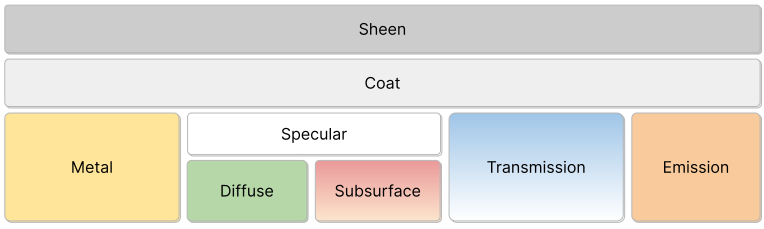
Principled Material
Layered PBR material interface based on the OpenPBR model (as seen in Blender's Principled BSDF), offering full support with the exception of 3.8 Thin-film iridescence
Principled Hair Material
Principled Hair BSDF's Chiang single-scattering model implementation. Many bounces may be required to derive accurate hair scattering phenomena.
Color Pipeline
- OCIO-based SDR & HDR color pipeline
- Linear BT.709 scene space (D65), converted to D60 via Bradford CAT and encoded as AP1
- ACEScct log-space encoding for grading and display transforms
- LUT-based output transforms for SDR/HDR — ACES 1.3, ACES 2.0, AgX, Standard (sRGB and PQ)
- 1-to-1 match with Blender OCIO output
Path Tracer
- Full Foundation Material support
- Unidirectional megakernel integrator with tiled sampling
- Energy conserving BSDFs with Cycles output parity
- Sobol & PCG samplers
- Path-traced Subsurface scattering
- Path-traced Chiang Hair/fur shading
- Curve rendering for hair/fur, etc
- Importance sampled environment maps
- Anamorphic physical lens
- Area, point, spot, and directional lights
- Uniform/Power light sampling with alias tables
- Runs entirely in your Vulkan GPU :)
Rasterizer
- GPU-driven mesh shader pipeline with hierarchical continuous LOD
- Two-phase meshlet occlusion culling
- Optional RT Shadows
Scene
- Extended glTF support & Blender data exchange via https://github.com/mos9527/Foundation-Blender-IO/tree/main
- Custom binary scene format
FSCNwith excellent serialization/loading (memory-mapped) performance - Animation (Skinning, BlendShapes, Articulated rigid bodies)
Examples
Smaller examples, using the framework as a library (therefore excluding the renderers) are provided for reference and testing purposes.
These be found in The Examples directory.
TODO SCREENSHOTS
Building
cmake is required for builds. A C++20 compliant compiler is also required.
All third-party dependencies are included as FetchContent declarations. See Thirdparty for a comprehensive list.
Slang is required for building shaders for all backends, and should be available in your PATH.
Vulkan SDK is required for building the VulkanApplication backend.
Windows
You can build, and debug the app with Visual Studio's CMake intergration. Or with any alternative CMake workflow of your choice.
The Vulkan SDK installer should take care of most, if not all the setup for you.
CI Builds are provided for this platform. You can get them from nightly
Linux
Refer to https://docs.vulkan.org/tutorial/latest/02_Development_environment.html#_linux_2 for setting up the Vulkan SDK on Linux.
- Arch Linux # Enable [extra-testing] in /etc/pacman.conf for the latest validation layers et alsudo pacman -S vulkan-validation-layers vulkan-tools vulkan-radeon vulkan-headers
macOS
Install the official Vulkan SDK.
The Editor will build but not run on this platform, due to our extensive usage of Shader Binding Tables and Mesh Shaders, which are not supported.
Building from command line
The following commands will create a build directory, generate the build system files, and build all targets with 8 parallel jobs. Binary artifacts will be located in build/bin/.
Build Options
The following CMake options are available:
| Option | Description | Default |
|---|---|---|
| FOUNDATION_WITH_ASAN | Build with Address Sanitizer enabled | OFF |
| FOUNDATION_WITH_TSAN | Build with Thread Sanitizer enabled | OFF |
| FOUNDATION_WITH_PROFILING | Build with profiler (Tracy) enabled | ON |
| FOUNDATION_RHIVULKAN_VALIDATION_LAYER | Build with Vulkan Validation Layer enabled | ON |
| FOUNDATION_WITH_EXAMPLES | Build examples | ON |
| FOUNDATION_WITH_TESTS | Build tests | ON |
Toggle these options with -D<OPTION>=ON/OFF when running cmake .., e.g. cmake -DFOUNDATION_WITH_SANITIZERS=ON ..
CMake Unity Builds are supported, and can be enabled with -DCMAKE_UNITY_BUILD=ON when running cmake ...
Third party
Core
- https://github.com/microsoft/mimalloc.git
- https://github.com/fmtlib/fmt.git
- https://github.com/gabime/spdlog.git
- https://github.com/wolfpld/tracy.git
Math
RHIVulkan
Editor, Examples & Tests
- https://github.com/nothings/stb.git
- https://github.com/thisistherk/fast_obj
- https://github.com/zeux/meshoptimizer.git
Debugging
Vulkan
- VVL Timeline resource tracking has been an issue - though should be resolved by now. Always update the SDK to the latest version.
- RenderDoc is generally enough for most debugging tasks.
- Though some esoteric issues would eventually require HW specific tools for accurate timing and performance metrics.
- NSight™ Graphics for NVIDIA GPUs
- Radeon™ Developer Tool Suite
TODOs
Framework
- RHI Backends
- [x] Vulkan
- [x] Desktop (Windows & Linux) Probably the only platform we truly care about
- [ ] Mobile.
- Try getting examples to work there. Seems (very much not) fun...
- Almost no device supports the full RT pipeline
- Newer Adrenos support Mesh Shaders
- [-] Metal
- Loosely speaking - Apple GPUs are all tilers. So they are all categorically mobile.
- There are Vulkan-on-Metal layers, which we do work with - albeit with lots of limitations.
- Our Examples that don't use unsupported features work OOTB (macOS)
- Raster looks good with up-to-date Mesh Shader support. Practically no VK compat layers support them yet. [2026/05/10]
- Raytracing - No native SBTs. No SER. Metal can do inline queries only.
- [ ] TODO iOS builds?
- [x] Lavapipe
- https://www.vulkan.org/user/pages/09.events/vulkanised-2025/T5-Lucas-Fryzek-Igalia.pdf
- Small Guide on Windows usage:
- Get build from https://github.com/pal1000/mesa-dist-win/releases
- Set environment variable VK_ADD_DRIVER_FILES to fullpath pointing to
lvp_icd.x86_64.json(per Driver Discovery) - Run stuff from the shell.
- [x] Vulkan
Editor
- [x] Correct SDR&HDR Color Pipeline
- Linear BT709 Scene Space (D65), converted to D60 via Bradford CAT and encoded as AP1
- Transform then encodes as ACEScct
- Rest of the transform handled by LUTs in ACEScct log space, incl. to display EOTF. See
Scripts/OCIOBakeLUTs.py - Blender OCIO Config used to generated LUTs for SDR/HDR ACES1.3/2.0/AgX/Standard (sRGB. v. PQ) transforms
- See also https://docs.blender.org/manual/en/latest/render/color_management/
- Obtains 1-to-1 matching output :)
- [ ] Coroutines in place of...whatever this is. Good to have, not necessary.
- [ ] Scene Graph, instead of AoS to represent instances. Done
- [x] Animation (Skinning, BlendShapes, Articulated rigid bodies. Contribution by Claude)
Path Tracer
Also w/ blog post series update on:
- [ ] Denoising
- [ ] Light Tree (BVH Light Sampling)
- [ ] ReSTIR Spatial + Temporal Reuse
- [ ] Spatial Reuse (SHaRC?)
- [ ] MNEE (Manifold NEE) for much better caustics convergence
- [ ] Volume rendering
- [ ] Thin Film Iridescence
- "A Practical Extension to Microfacet Theory for the Modeling of Varying Iridescence" https://dl.acm.org/doi/pdf/10.1145/3072959.3073620
Done, awaiting Blog Update:
- [x] Hair Shading
- [x] Curve (hair, fur) rendering
- Beizer Segments via De Casteljau, a la PBRT's Curves
- Intersected as flat cross-sections with TBN that 'makes it look like a swept cylinder'
- Procedurally traced, data exchange done via our own Blender IO (https://github.com/mos9527/Foundation-Blender-IO)
- [ ] TODO Possiblity to bind strands to mesh - therefore texturing it?
- [x] Path Traced Skin BSSRDF
- Disney BSSRDF from PBRTv3
- Uniformly selects exitance point on scattered path via AnyHit + reservoir sampling
- [x] Transparent shadows from Area Lights
- Environment lights and emissive objects naturally cast caustics.
- Area lights are also added as procedural geometry into TLAS, allowing them to be hit by BSDF rays and evaluated with MIS w/ NEE.
- Needs a large energy/firefly clamp.
- Not done for analytical lights (Point/Directional) as they are delta distributions and cannot be hit by BSDF rays.
- Conversion to small disk lights is feasible, or another O(N) loop to evaluate all of those inline w/o going through scene BVH
- Not worth it nonetheless. This is merely brute-forcing.
- [x] Alias Sampling scene lights
- [x] Importance sampling Infinite Image Lights
Done:
- Revisiting Physically Based Shading at Imageworks - Kulla & Conty 2017
- [x] Complete Multiscatter Energy Compensation
- See also
Scripts/LUTPrecomputeGGX.ipynb - [x] Dielectrics Reflection
- Approximate aniso materials with the same LUT
- [x] Dielectrics Transmission
- Implies another dimension on IOR
- Darkening still noticeable at medium roughness.
- Cycles suffer from the same issue. Try out https://github.com/mos9527/Foundation-Resources/tree/master/white-furnace
- The slides, curiously, does not demonstrate white furnace for glass compensation
- More bounces can somewhat remedy the issue
- TODO Implement Heitz Random Walk ab initio?
- See also
- [x] Complete Multiscatter Energy Compensation
- [x] Texture sampling rate via ray differentials for primary rays
- Easy for camera rays, not so much for ones bouncing off BSDFs
- [x] Coat BSDF
- [x] Sheen BSDF/SGGX approx.
- LTC Sheen "Practical Multiple-Scattering Sheen Using Linearly Transformed Cosines" https://github.com/tizian/ltc-sheen
https://blog.selfshadow.com/publications/s2017-shading-course/imageworks/s2017_pbs_imageworks_sheen.pdf
- [x] PCG (Independent), Sobol Samplers
Raster
Unfortunately not the favourite child. Maybe one day.
- [ ] Really Speed up meshlet continuous LOD selection.
- We're O(N). Nanite does it O (log N) via BVH
- [ ] IBL
- [ ] Screen Space Diffuse GI
- [ ] Screen Space Reflections
- [ ] Screen Space Ambient Occlusion
- [ ] Light Probe Volumes